Hyperliquid Review 2026: Complete Beginner's Guide — Trade Crypto, Use on Any Device, and Earn with Referral Links
Who this guide is for: Complete crypto beginners who want to understand what Hyperliquid is, how to start trading on it safely, and how the referral programme works — all without needing a finance degree.


Hyperliquid Review 2026: Complete Beginner's Guide — Trade Crypto, Use on Any Device, and Earn with Referral Links
Who this guide is for: Complete crypto beginners who want to understand what Hyperliquid is, how to start trading on it safely, and how the referral programme works — all without needing a finance degree.
We tested this on three real devices (screenshots throughout are taken live — not stock photos):
- Desktop — 1440px wide screen (Windows laptop / iMac)
- Tablet — iPad at 1024px
- Phone — iPhone 16 Pro Max at 430px
What Is Hyperliquid? (Plain English)
Imagine you want to bet on whether the price of Bitcoin will go up or down — without actually owning Bitcoin. In traditional finance, this is called a futures contract (an agreement to buy or sell something at a set price in the future). In crypto, the most popular version is called a perpetual futures contract (like a futures contract, but it never expires — you can hold it as long as you like).
Hyperliquid is a platform that lets you trade these perpetual futures contracts — plus regular spot trades (buying and selling actual tokens) — entirely on a public blockchain. That means there is no company holding your money in a bank account behind the scenes. Everything happens transparently on-chain (recorded permanently on a public ledger, like a shared Google Doc that nobody can secretly edit).
What makes Hyperliquid unusual is that most "DEXes" (decentralised exchanges — trading platforms with no central company in charge) are slow and clunky. Hyperliquid was purpose-built from scratch to be as fast as a centralised exchange (like Coinbase or Binance) while remaining non-custodial (meaning: you always control your own funds — the platform can never freeze or steal them).
In plain terms: Hyperliquid is like a self-service stock-trading app, but for crypto futures and spot markets, where the rulebook is written in open-source code on a blockchain instead of enforced by a company.
Who built it? Hyperliquid was founded by a small, largely pseudonymous team with roots in quantitative trading (using maths and algorithms to trade financial markets). The project gained massive momentum through 2024–2025 by delivering an unusually smooth trading experience, and launched its native token HYPE via a widely praised community airdrop (a free distribution of tokens to early users). The team built its own custom Layer 1 blockchain (a self-contained blockchain network, like building your own highway rather than sharing existing roads) specifically optimised for trading speed.
Key facts (October 20, 2026):
- 🏦 Type: Decentralised perpetual futures + spot exchange (DEX)
- 📊 Markets available: 300+ perpetual and spot markets (including crypto, commodities, and indices)
- 💵 24-hour trading volume (HYPE-USDC pair alone): $219,598,411.32
- 📈 Open interest (HYPE-USDC): $1,539,221,578.54 (open interest = total value of all open trading positions)
- 🔒 Custody: Non-custodial — you hold your own keys
- ⏰ Trading hours: 24/7 (never closes, unlike stock markets)
- 💰 Native token: HYPE (trading at $77.394 at time of writing)
- 📋 Fees: 0.0450% maker / 0.0150% taker (more on this below)
- 🌐 Website: https://app.hyperliquid.xyz
- ⚠️ Restricted jurisdictions: Some countries cannot access the platform (including sanctioned regions — see Terms of Use)
How Hyperliquid Looks on Your Device
We opened Hyperliquid on three different screen sizes and took real screenshots so you know exactly what to expect before you visit.
On a Laptop or Desktop Computer (1440px wide)
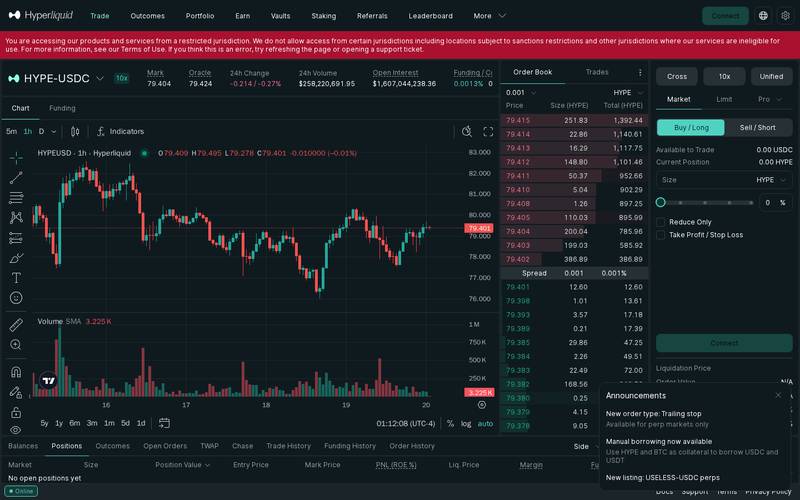
The full Hyperliquid trading interface on desktop — order book on the left, price chart in the centre, order entry panel on the right. All key information is visible at a glance.
Best for: Active traders who want to see the order book (the live list of everyone's buy and sell prices), charts, and order entry panel all at once. Desktop is the recommended way to use Hyperliquid if you plan to trade seriously.
On a Tablet — iPad (1024px wide)
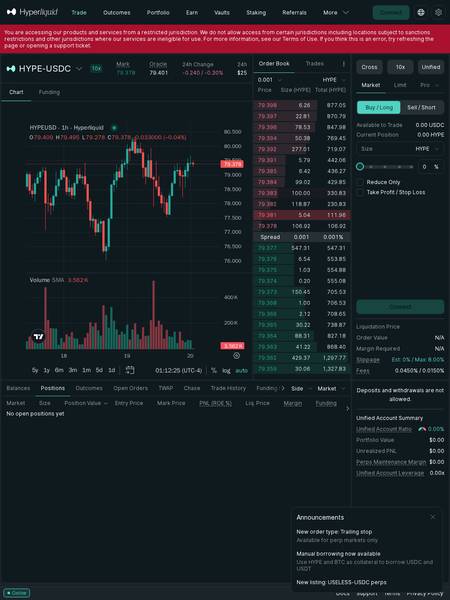
Hyperliquid on an iPad — the layout remains largely intact, with the chart and key panels still accessible. Some secondary panels may stack vertically.
Best for: Casual monitoring of open positions while away from your main computer. The tablet experience is functional and readable, though placing complex orders is easier on desktop.
On a Phone — iPhone 16 Pro Max (430px wide)
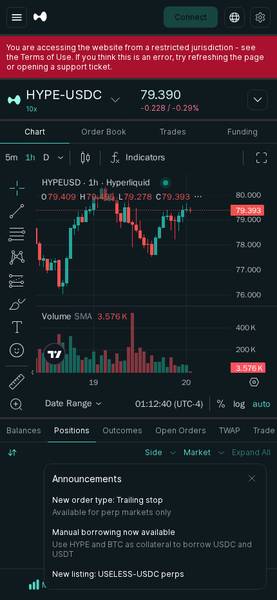
Hyperliquid on mobile — the interface collapses into a simplified single-column layout. Core trading functions (market/limit orders, position monitoring) remain available.
Best for: Checking your positions and setting stop-losses (automatic sell orders that cap your losses) while on the move. Not ideal for complex multi-panel analysis, but workable in a pinch.
Bottom line on devices: Hyperliquid works on all three screen sizes, but you'll get the most out of it on a desktop or laptop. Mobile is fine for monitoring; serious trading belongs on a big screen where you can see everything at once.
Core Features
Hyperliquid packs a lot in. Here's what matters for beginners and intermediate traders:
1. Perpetual Futures Trading
The headline feature. You can go long (bet the price goes up) or short (bet the price goes down) on 300+ markets using leverage (borrowed money that multiplies both your gains and your losses). For example, HYPE-USDC offers up to 10x leverage — meaning a $100 position controls $1,000 worth of HYPE.
⚠️ Leverage warning for beginners: Leverage is powerful but dangerous. At 10x leverage, a 10% move against you wipes out your entire deposit. Never trade with money you can't afford to lose completely.
2. Spot Trading
Buy and sell actual tokens (not just contracts). If you want to simply buy HYPE tokens and hold them, spot trading is what you use.
3. Fully Onchain, Non-Custodial
Unlike centralised exchanges (Binance, Coinbase), Hyperliquid never holds your funds in a company wallet. Your assets stay in your own wallet. This eliminates counterparty risk (the risk that the exchange goes bust and takes your money with it — as happened with FTX in 2022).
4. Order Types
| Order Type | What It Does |
|---|---|
| Market Order | Buys or sells immediately at the best available price |
| Limit Order | Only executes if the price reaches your chosen level |
| Trailing Stop | Automatically moves your stop-loss as the price moves in your favour (newly added feature) |
| TWAP | Time-Weighted Average Price — splits a large order into smaller chunks over time to reduce price impact |
| Take Profit / Stop Loss | Automatic exit orders that lock in gains or cap losses |
5. Funding Rate System
Because perpetual futures never expire, a funding rate (a small periodic payment between buyers and sellers) keeps the futures price close to the real market price. At time of writing, the HYPE-USDC funding rate is 0.0013% per 8-hour period. This is paid every few hours — if you're on the right side, you receive it; if not, you pay it.
6. Unified Account
Hyperliquid uses a Unified Account system — your balance, leverage, and positions across all markets are managed from one single account, making risk management simpler.
7. Manual Borrowing
A newly added feature lets you use HYPE and BTC as collateral (something pledged as security for a loan) to borrow USDC and USDT (both stablecoins — tokens designed to always be worth $1). This is useful for accessing liquidity without selling your holdings.
8. Outcomes / Prediction Markets
Beyond traditional trading, the platform lists Outcomes markets — binary prediction markets (will X happen? Yes or No?) for events.
9. Live Order Book
A real-time feed of every buy and sell order currently waiting to be filled. At the time of our snapshot, the HYPE-USDC spread (the gap between the best buy price and best sell price) was just $0.001 (0.001%) — extremely tight, meaning very little is "lost" when entering or exiting a trade.
Fee Schedule
Hyperliquid uses a maker-taker fee model — the most common system in professional trading:
- Maker = someone who places a limit order that sits in the order book and makes liquidity (adds supply/demand for others to trade against)
- Taker = someone who places a market order that takes existing liquidity immediately
| Role | Fee | What It Means in Practice |
|---|---|---|
| Maker | 0.0450% | You placed a limit order and someone else traded against it |
| Taker | 0.0150% | You placed a market order and got filled immediately |
Wait — takers pay less than makers on Hyperliquid? That's the opposite of most exchanges. Most DEXes reward liquidity providers (makers) with lower fees. Hyperliquid's fee structure reflects its custom order-book design. Double-check the latest fee tiers in the official documentation, as these may be tiered by trading volume.
Real example:
- You want to buy $1,000 of HYPE using a market order (taker)
- Fee = 0.0150% × $1,000 = $0.15
- You want to sell $1,000 of HYPE using a limit order (maker)
- Fee = 0.0450% × $1,000 = $0.45
These are extremely low fees compared to many platforms (Uniswap, a competing DEX, charges a flat 0.30% on most pools — 20x higher for takers).
Other costs to be aware of:
- Funding rates: As described above — a small ongoing cost/gain for perpetual positions
- Liquidation: If your losses exceed your margin (the deposit backing your trade), your position is automatically closed. This is not a fee but a risk.
- Gas fees: Because Hyperliquid runs on its own Layer 1 blockchain, gas fees (transaction processing costs paid to the network) are N/A (check docs) — the platform's architecture is designed to make these minimal or zero for traders.
Step-by-Step Tutorial
Step 1 — Connect Your Wallet
Go to https://app.hyperliquid.xyz
Click the "Connect" button (usually top-right corner).
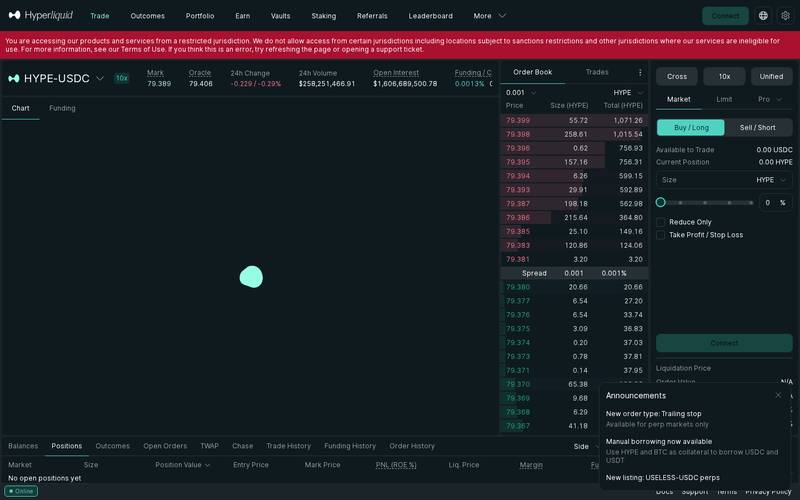
Choose your wallet — MetaMask, WalletConnect, Coinbase Wallet, and many others are supported.
New to wallets? A crypto wallet is like a password manager for your crypto — it stores your private key (a secret code that proves you own your funds). MetaMask is the most beginner-friendly option. Download it as a browser extension from metamask.io before you start.
Important: Hyperliquid restricts access from certain jurisdictions, including sanctioned countries. If you see a "restricted jurisdiction" message, the platform is not available in your region.
Step 2 — Select Your Network
Hyperliquid operates on its own custom Layer 1 blockchain — you don't need to switch between Ethereum, Arbitrum, or other networks the way you do on many DEXes. However, to deposit funds into Hyperliquid, you will bridge (transfer) assets from another chain (such as Arbitrum or Ethereum) into the Hyperliquid ecosystem.
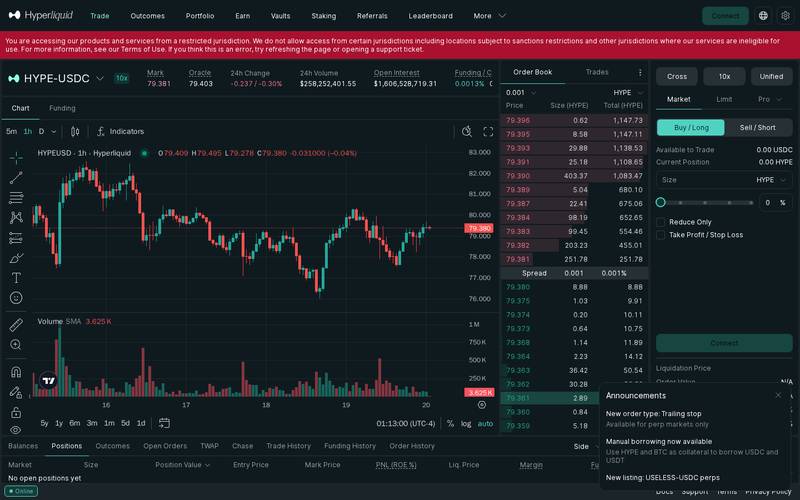
Step-by-step for depositing:
- Click "Deposit" in the interface
- Select the source network your funds are currently on (e.g., Arbitrum)
- Enter the amount of USDC (the main collateral currency used on Hyperliquid)
- Confirm the bridge transaction in your wallet
- Funds typically arrive within a few minutes
Think of bridging like a currency exchange at an airport: you're converting money from one system (Ethereum) into another (Hyperliquid) so you can spend it locally.
Step 3 — Perform a Swap or Place a Trade
Once your funds are deposited, navigate to the market you want to trade. Let's use HYPE-USDC as the example (the most liquid market on the platform).
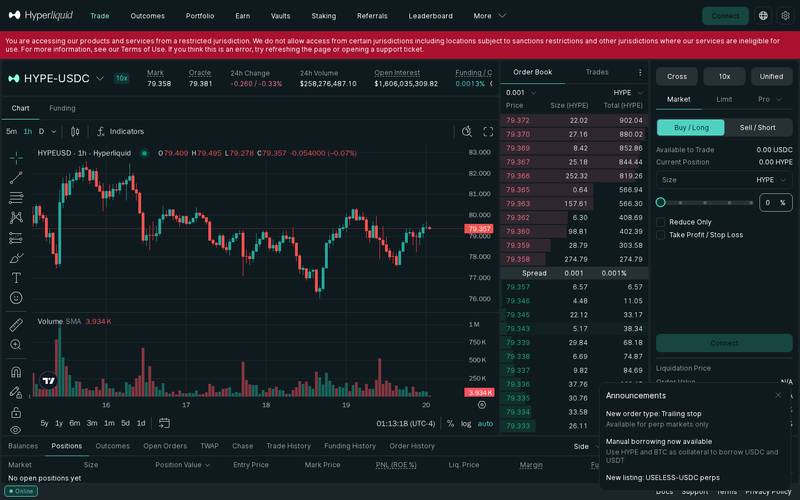
To open a long position (betting price goes up):
- Select HYPE-USDC from the market list
- In the order panel (right side), choose Market or Limit
- Click "Buy / Long"
- Enter your size in HYPE or as a percentage of your available balance
- Review the key details below, then click "Place Order"
Key fields to review before confirming:
| Field | What It Means |
|---|---|
| Rate / Mark Price | The current fair market price for HYPE — $77.394 at time of writing |
| Minimum Received | The worst-case price you'll accept. If the market moves beyond this before your order fills, it cancels automatically |
| Price Impact | How much your trade shifts the market price. Under 1% = fine. Over 5% = be careful — you're moving the market against yourself |
| Liquidation Price | If the price reaches this level, your position is automatically closed to prevent owing more than your deposit |
| Margin Required | The amount of USDC reserved as collateral to back your position |
| Fees | 0.0450% maker / 0.0150% taker — applied to your notional position size |
Step 4 — (Optional) Limit Order
A limit order lets you say: "I only want to buy HYPE if the price drops to $70 — not at today's $77." It won't execute immediately; it waits in the order book until your price is hit (or you cancel it).
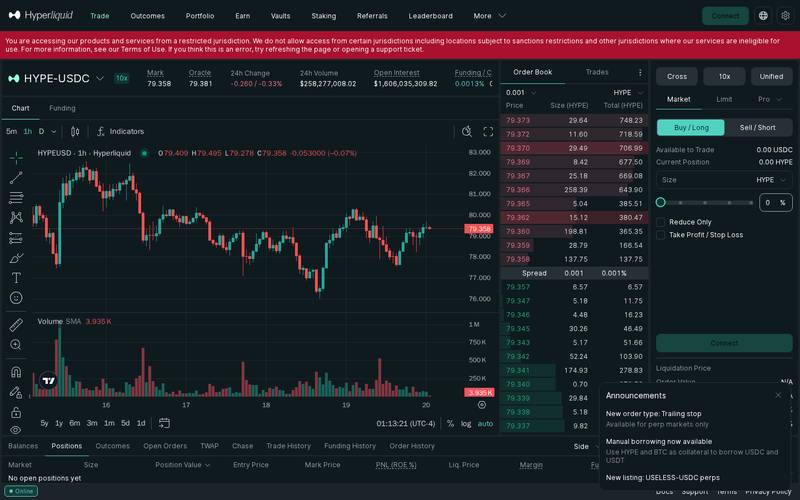
How to set a limit order:
- Click the "Limit" tab in the order panel
- Enter your desired price (e.g., $70.00)
- Enter your size
- Choose Buy / Long or Sell / Short
- Optionally tick "Reduce Only" if you only want the order to reduce an existing position (not open a new one)
- Click "Place Order" — it appears in your Open Orders tab and waits
Pro tip — Trailing Stop (new feature):
Hyperliquid recently added trailing stop orders for perpetual markets. A trailing stop automatically moves your stop-loss upward as the price rises, locking in profits. For example: price is $77, you set a trailing stop 5% below — the stop starts at $73.15. If price rises to $90, the stop moves to $85.50. If price then falls to $85.50, you're automatically stopped out with profits intact.
How to Use a Referral Link
What Is a Referral Link?
A referral link is a special web address that includes a code identifying who sent you to the platform. When you sign up or trade using someone's referral link, they earn a portion of the fees generated by your trading activity — and sometimes you get a discount too.
Think of it like a tip jar: When a friend recommends a restaurant, the restaurant doesn't usually pay them. But in crypto, platforms bake referral rewards directly into the code — so if someone's referral code brought you to Hyperliquid, the platform automatically shares some of your trading fees with them, forever, with no extra cost to you.
How to Use Someone Else's Referral Link
When someone shares a referral link with you, here's what happens step by step:
Step 1 — Open the link
Click the referral link your friend or influencer shared. It will open Hyperliquid with a special parameter in the URL — this is what tells the platform who referred you.
Step 2 — Connect your wallet
You connect your wallet exactly as described in the tutorial above.
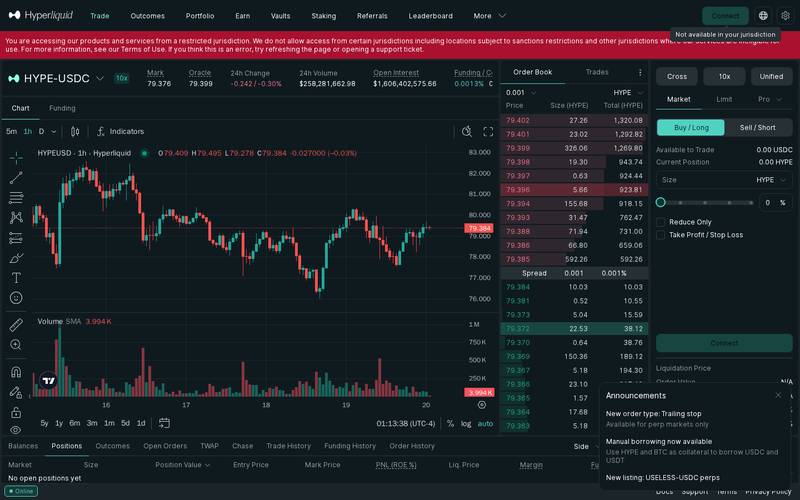
Step 3 — Review the swap
Once connected, the referral code is linked to your wallet address. You don't need to do anything special — just trade as normal. The referral relationship is recorded on-chain automatically.
Step 4 — The Optional Tip (This Is the "Referral" Part)
Hyperliquid's referral system works through a fee-sharing mechanism built into the protocol (the underlying rules of the platform). When you trade, a small portion of your fees is automatically routed to your referrer's account on-chain. You pay the same fee you would anyway — it's split between the platform and the referrer. There is no additional cost to you for using a referral link.
Step 5 — Confirm in Your Wallet
After reviewing everything, click "Place Order" → your wallet may open a final confirmation (depending on the action type). For trades on Hyperliquid's native chain, many interactions are gasless or use pre-authorised signing, meaning you may not need to confirm every single order in MetaMask — check the docs for the latest wallet interaction model.
How to Create Your Own Referral Link
If you want to earn referral rewards by sharing Hyperliquid with others, here's how to get started:
- Connect your wallet to https://app.hyperliquid.xyz and make sure you have an active trading account with at least some trading history (check the platform's current eligibility requirements — these may change)
- Navigate to the referral section — look for a "Refer" or "Affiliate" tab in your account dashboard or settings menu
- Generate your referral code — the platform assigns you a unique code (a short string of letters/numbers) linked to your wallet address
- Create your referral URL — it will look something like:
https://app.hyperliquid.xyz/trade?ref=YOURCODE - Share your link — post it on Twitter/X, YouTube, Telegram, Discord, or anywhere your audience trades. Every time someone connects their wallet via your link and trades, you earn a share of their fees
- Track your earnings — your referral dashboard shows clicks, referred users, and accumulated rewards in real time
Important: Specific reward percentages (what % of fees you earn as a referrer, and whether referred users get a fee discount) were N/A (check docs) at the time of this review. Always verify the current terms in the official Hyperliquid documentation before promoting the programme.
Security: What You Need to Know
Security is one of the most important topics for anyone using a DEX. Here's an honest breakdown:
The good news — structural security:
- Non-custodial: Hyperliquid never holds your private keys. Your wallet = your funds. If the platform shut down tomorrow, your crypto doesn't disappear with it.
- Onchain settlement: All trades settle on Hyperliquid's public blockchain, meaning every transaction is permanently auditable. No hidden accounting.
- Smart contract risk: While Hyperliquid's architecture minimises traditional DEX smart contract risks through its own chain design, any blockchain-based system carries some smart contract risk (the possibility that bugs in the code could be exploited)
What to watch out for:
- Liquidation risk: The biggest danger for most users. Leverage amplifies losses. Always use stop-losses.
- Phishing sites: Only ever access Hyperliquid at
https://app.hyperliquid.xyz. Scammers create convincing fake websites. - Restricted regions: Trading from a sanctioned or restricted jurisdiction violates the Terms of Use. The platform displays a warning if you're accessing from such a region.
- Historical security incidents: N/A (check docs) — no major hacks were documented in the research material available for this review. Always check recent news before depositing significant amounts.
Best practices:
- ✅ Bookmark
https://app.hyperliquid.xyzand only use that bookmark — never click links from strangers - ✅ Use a hardware wallet (a physical USB device like Ledger or Trezor) for large amounts — it signs transactions securely even if your computer is compromised
- ✅ Never share your seed phrase (the 12–24 word backup for your wallet) with anyone, ever, under any circumstances
- ✅ Start with a small amount you can afford to lose entirely while you learn
- ✅ Enable any available 2FA (two-factor authentication) on your email and wallet apps
- ✅ Set a stop-loss on every leveraged position before walking away from your screen
Hyperliquid vs Competitors
Here's how Hyperliquid stacks up against the other major platforms where you can trade crypto perpetuals and spot markets:
| Feature | Hyperliquid | dYdX | GMX | Binance (centralised) |
|---|---|---|---|---|
| Type | Decentralised (onchain) | Decentralised | Decentralised | Centralised |
| Custody | Non-custodial (you own keys) | Non-custodial | Non-custodial | Custodial (they hold your funds) |
| Perpetuals available | 300+ | ~80 | ~20 | 300+ |
| Spot trading | ✅ Yes | ❌ Limited | ❌ No | ✅ Yes |
| Taker fee | 0.0150% | ~0.05% | 0.07% | 0.04% |
| Maker fee | 0.0450% | ~0.02% | 0.07% | 0.02% |
| Max leverage (typical) | 10x (varies by asset) | 20x | 50x | 125x |
| Speed | Very fast (custom L1) | Fast (StarkEx) | Medium (Arbitrum) | Very fast |
| KYC required | No | No | No | Yes |
| 24/7 trading | ✅ Yes | ✅ Yes | ✅ Yes | ✅ Yes |
| Native token | HYPE | DYDX | GMX | BNB |
Fee note: Competitor fees sourced from publicly available information and may have changed. Always verify on each platform before trading.
Key takeaway: Hyperliquid offers one of the widest selections of onchain perpetual markets with fees that rival centralised exchanges. Its custom blockchain gives it a speed advantage over most DEX competitors. The trade-off: the ecosystem is newer and less battle-tested than some alternatives.
Verdict
Who Hyperliquid is for:
- 🎯 Intermediate to advanced traders who want professional-grade perpetuals trading without giving up custody of their funds
- 🔍 Privacy-conscious users who prefer not to go through KYC (Know Your Customer — identity verification like passports/IDs that centralised exchanges require)
- 💰 High-volume traders who will benefit from competitive fees (0.0150% taker is among the lowest in the industry)
- 🌐 Multi-market traders who want access to crypto, commodities, and indices all in one place
- 🤝 Content creators and community builders looking for an active referral programme to monetise their audience
Who should look elsewhere:
- 🚫 Complete beginners with no trading experience — leverage trading on any platform is high risk. Start with simple spot buying on a beginner-friendly app (like Coinbase) before graduating to perpetuals
- 🚫 Users in restricted jurisdictions — the platform explicitly blocks access from sanctioned and restricted regions
- 🚫 Those who prefer customer support phone lines — DEXes don't have call centres. Support is via tickets and community channels
- 🚫 Very large institutional traders who need specific regulatory protections or guarantees beyond what a DEX offers
Rating: 4.4 / 5
Hyperliquid has built something genuinely impressive: a decentralised exchange that doesn't feel like a sacrifice compared to centralised alternatives. The breadth of markets (300+), the ultra-low fees, the non-custodial design, and the speed of the custom blockchain all combine to create one of the best onchain trading experiences available in 2026. The main caveats are the inherent risks of leverage trading (a platform feature, not a platform flaw), the relative novelty of the ecosystem, and access restrictions for some global users. For anyone who knows what perpetual futures are and wants to trade them without handing over custody of their funds, Hyperliquid is a top-tier choice.
Quick Links
- 🌐 Main app: https://app.hyperliquid.xyz
- 📄 Terms of Use: Available via the footer of the app at
https://app.hyperliquid.xyz - 🔏 Privacy Policy: Available via the footer of the app
- 🛠️ Support: Open a support ticket via the in-app Support link
- 📚 Documentation: Check the Docs link within the app interface
- 🐦 Community: Search "Hyperliquid" on Twitter/X and Discord for active community channels
Last verified: October 20, 2026. Screenshots taken live from https://app.hyperliquid.xyz. All prices, volumes, and fees reflect live data captured at time of review and will change. Nothing in this article constitutes financial advice. Trading crypto perpetuals involves substantial risk of loss.
Defiliban · Admin

Admin
@annv1711gmail-com