Hyperliquid Review 2026: Complete Beginner's Guide
Who this guide is for: Anyone curious about trading crypto on a decentralised exchange (a platform where no company holds your funds) but who finds most explanations too technical. We cover everything from connecting your wallet for the first time to placing your first leveraged trade, in plain English throughout.


Hyperliquid Review 2026: Complete Beginner's Guide
Who this guide is for: Anyone curious about trading crypto on a decentralised exchange (a platform where no company holds your funds) but who finds most explanations too technical. We cover everything from connecting your wallet for the first time to placing your first leveraged trade, in plain English throughout.
We tested this on three real devices (screenshots throughout are taken live, not stock photos):
- Desktop : 1440px wide screen (Windows laptop or iMac)
- Tablet : iPad at 1024px
- Phone : iPhone 16 Pro Max at 430px
What Is Hyperliquid? (Plain English)
Imagine a stock exchange where you can bet that a price will go up or down, except instead of calling a broker, you do it directly from your own crypto wallet with no middleman holding your money. That is Hyperliquid in one sentence.
More technically, Hyperliquid is a decentralised perpetuals and spot exchange (a marketplace for trading crypto contracts and actual tokens) that runs entirely on its own custom blockchain. A "perpetual" contract, often called a "perp," is like a bet on whether the price of something will rise or fall. Unlike a futures contract that expires on a set date, a perpetual contract stays open as long as you choose to keep it open, as long as your account can cover any losses.
Everything on Hyperliquid happens on-chain, meaning every order, every trade, and every settlement is recorded on a public blockchain rather than on a private company server. This means you can verify every transaction yourself and no single company can freeze or misappropriate your funds.
In plain terms: Hyperliquid is a trading platform built on its own blockchain where you can trade crypto derivatives (price bets) and spot tokens directly from your wallet, with no sign-up form, no identity verification, and no company holding your coins.
Who built it? Hyperliquid was built by a team that launched its mainnet in late 2023. The project gained rapid traction in the DeFi (Decentralised Finance, meaning financial services built on blockchains) community for offering a centralised-exchange-quality trading experience, including a fast order book and professional charting tools, while remaining fully non-custodial (you always keep control of your assets). The platform's native token is HYPE, which is used for governance and various protocol functions.
Key facts (October 20, 2026):
- Platform: Hyperliquid, available at app.hyperliquid.xyz
- Markets available: 300+ perpetual and spot markets
- HYPE token mark price at time of writing: $77.394
- 24-hour trading volume on HYPE-USDC perp: $219,598,411.32
- Open interest on HYPE-USDC perp: $1,539,221,578.54
- Taker fee: 0.0450%
- Maker fee (rebate): 0.0150%
- Maximum leverage on HYPE-USDC: 10x
- Custody model: Non-custodial (you keep control of your funds)
- Availability: 24/7, restricted in certain jurisdictions including sanctioned regions
- Asset types: Perpetual contracts and spot tokens, including crypto, commodities, and indices
- Collateral options: USDC, USDT, HYPE, and BTC (for borrowing)
- New features as of writing: Trailing stop orders (perps only), manual borrowing using HYPE and BTC as collateral
How Hyperliquid Looks on Your Device
We opened Hyperliquid on three different screen sizes and took real screenshots so you know exactly what to expect before you visit.
On a Laptop or Desktop Computer (1440px wide)
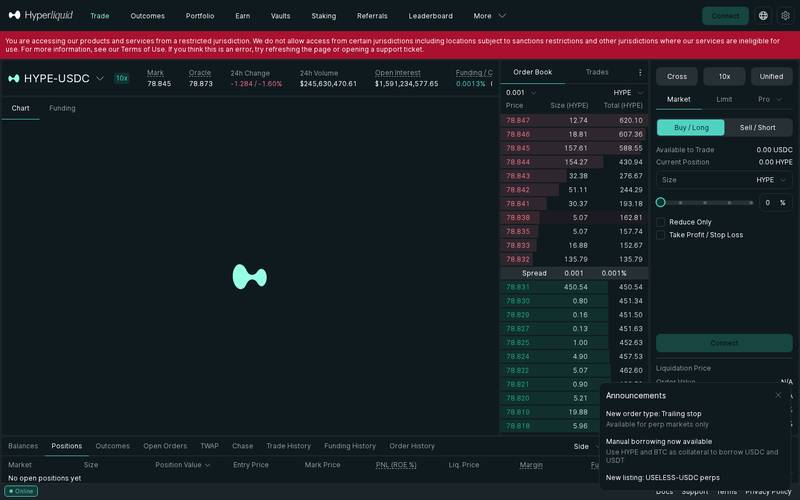
The full desktop trading view shows the price chart (powered by TradingView), the order book, the trade entry panel, and your open positions all at once. It looks and feels like a professional trading terminal.
Best for: Active traders who want to see the chart, order book, and trade panel simultaneously without scrolling. The desktop layout is the most information-dense view and is the one most experienced traders will prefer.
On a Tablet (iPad, 1024px wide)
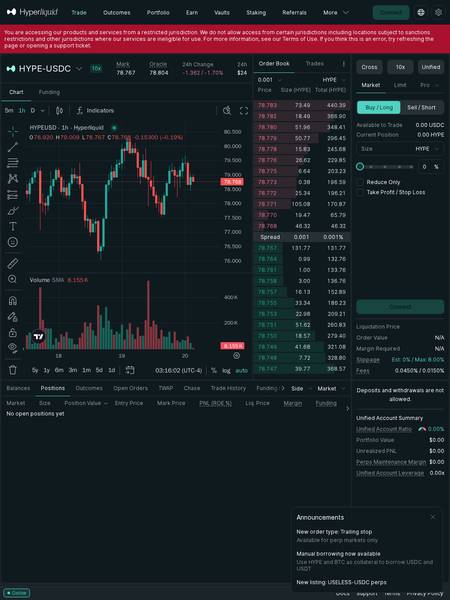
The tablet view preserves most of the desktop layout but compresses some panels. The chart and order entry form remain accessible side by side.
Best for: Traders who want portability without sacrificing too much screen real estate. Good for monitoring positions while away from a desk.
On a Phone (iPhone 16 Pro Max, 430px wide)
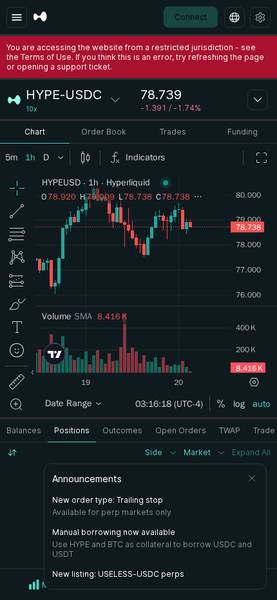
On mobile the interface stacks vertically. You scroll between the chart, order entry, and positions. Core functionality is all there but it requires more tapping and scrolling compared to desktop.
Best for: Checking open positions, closing trades quickly, or placing straightforward market orders when you are away from a computer. Not ideal for detailed chart analysis.
Bottom line on devices: Hyperliquid works on all three screen sizes, but serious trading is best done on desktop. The mobile experience is functional and genuinely usable, which puts it ahead of many competitor platforms, but the sheer density of information available on desktop makes it the preferred environment for anyone placing leveraged trades.
Core Features
Perpetual Contracts (Perps)
A perpetual contract is the flagship product on Hyperliquid. You choose a market, say BTC-USDC, decide whether you think the price will go up (Long) or down (Short), choose how much leverage to apply, and open the trade. Leverage means borrowing extra capital to increase your position size. For example, with 10x leverage, $100 of your own money controls a $1,000 position. Gains are multiplied, but so are losses, and if the market moves against you too far, you get liquidated (meaning your position is automatically closed and you lose your collateral).
Hyperliquid offers 300+ perpetual markets covering crypto, commodities, and indices.
Spot Markets
In addition to perps, Hyperliquid supports spot trading, meaning you can buy and hold actual tokens rather than just price contracts. For example, you can buy HYPE tokens directly on the platform.
Fully Onchain Order Book
Unlike most DEXes (Decentralised Exchanges) that use an automated pricing formula (called an AMM, or Automated Market Maker), Hyperliquid uses a central limit order book, just like a traditional stock exchange, but recorded entirely on its own blockchain. This means buy and sell orders are matched at specific prices rather than through a formula, giving traders more precise control over entry and exit prices.
Funding Rate Mechanism
Perpetual contracts stay tied to the real asset price through a "funding rate," which is a small periodic payment made between traders on opposite sides of the market. At time of writing, the funding rate on HYPE-USDC is 0.0013% per interval. If the rate is positive, longs (people betting the price rises) pay shorts (people betting it falls) and vice versa. This mechanism keeps the perp price anchored to the real spot price.
Order Types
Hyperliquid supports multiple order types:
- Market order: Buy or sell immediately at the current best available price.
- Limit order: Set a specific price at which you want to buy or sell. The order waits until that price is reached.
- Trailing stop (new): A stop-loss order (an automatic close if the market moves against you) that follows the price as it moves in your favour. Available for perpetual markets only.
- TWAP (Time-Weighted Average Price): Splits a large order into smaller pieces over time to reduce market impact. Useful for large position sizes.
- Chase order: Automatically adjusts your limit order to chase the best available price.
- Take Profit / Stop Loss: Set both your target exit price and your maximum acceptable loss simultaneously.
Manual Borrowing
A newer feature allows you to use HYPE and BTC as collateral (something pledged against a loan) to borrow USDC or USDT (stablecoins, meaning tokens pegged to the US dollar). This is useful if you want liquidity without selling your held assets.
Unified Account
All your positions, balances, and margins across perps and spot are managed from a single Unified Account. The interface shows your Unified Account Ratio (a health score for your account), Portfolio Value, Unrealised PNL (profit or loss on open positions that has not been locked in yet), and your overall leverage at a glance.
Non-Custodial and Permissionless
You connect your own wallet. Hyperliquid never holds your private keys (the secret password that controls your crypto). Deposits and withdrawals go directly between your wallet and the on-chain protocol.
Fee Schedule
Hyperliquid uses a maker-taker fee model. A "taker" fills an existing order from the order book (removing liquidity), while a "maker" places an order that sits in the book waiting to be filled (adding liquidity). Makers are typically rewarded with lower fees or rebates because they help the market function.
| Role | Fee Rate | Plain English |
|---|---|---|
| Taker (market orders) | 0.0450% | You pay 0.045% of your trade size for instant fills |
| Maker (limit orders that rest) | 0.0150% rebate | You receive 0.015% of your trade size back as a reward |
| Slippage estimate | 0% estimated, max 8.00% | Difference between expected price and actual fill price |
| Borrow interest | N/A (check docs) | Varies by collateral type and utilisation |
| Withdrawal fees | N/A (check docs) | Check the platform for current rates |
To put the taker fee in concrete terms: if you place a $10,000 market buy on BTC-USDC, you pay $4.50 in fees. If you instead place a limit order that gets filled, you receive a $1.50 rebate. For active traders, the difference between using market orders and limit orders adds up significantly over time.
Step-by-Step Tutorial
Step 1: Open Hyperliquid and Connect Your Wallet
Go to app.hyperliquid.xyz and click the "Connect" button (usually top-right corner).
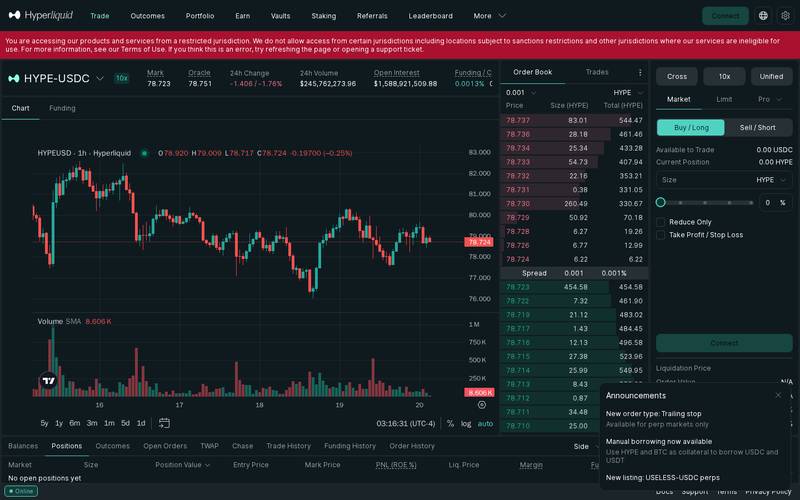
Choose your wallet from the list. MetaMask, WalletConnect, Coinbase Wallet, and others are supported.
Important note before connecting: Hyperliquid restricts access from certain jurisdictions, including locations subject to sanctions. If you see a message saying you are accessing from a restricted jurisdiction, the platform will not allow deposits or withdrawals in your region. Check the Terms of Use if you are unsure whether your location qualifies.
Once connected, you will see your wallet address appear in the top-right corner and your Unified Account Summary will show $0.00 until you make a deposit.
Step 2: Deposit Funds Into Your Hyperliquid Account
Hyperliquid operates on its own blockchain. To trade, you need to deposit USDC or USDT (or use HYPE or BTC if you want to borrow against them) from your wallet into the Hyperliquid layer. Think of this like depositing cash from your bank account into a brokerage account before you can start buying stocks.
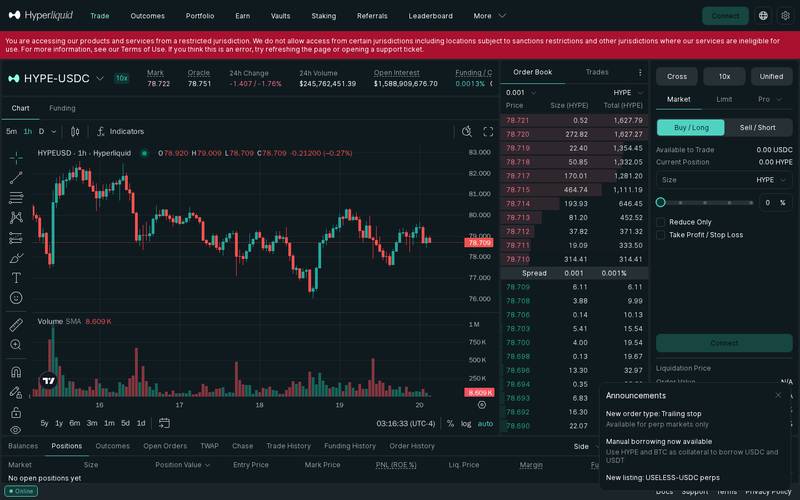
Look for the "Deposit" option in the interface. Select the asset you want to deposit (USDC is the most common starting point), enter the amount, and confirm the transaction in your wallet. The funds will appear in your Unified Account balance shortly after the on-chain transaction confirms.
What you need in your wallet before depositing: USDC or USDT on a supported network, plus a small amount of the network's native token to cover the gas fee (a small transaction processing fee paid to the blockchain). The exact supported deposit networks are listed in the platform's deposit flow. Check the current docs for the latest bridging options.
Step 3: Choose a Market and Set Up Your Trade
Once funds are deposited, click on any market in the left-hand sidebar or search for a specific asset. For this example, we will use HYPE-USDC, the perpetual contract for Hyperliquid's own token.
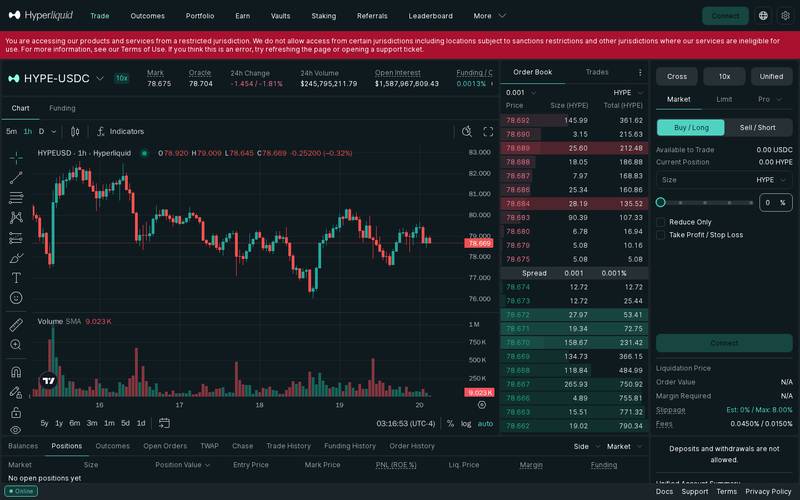
In the order panel on the right side of the screen, you will see three tabs: Market, Limit, and Pro.
For a first trade, use Market for simplicity.
- Click Buy / Long if you think the price will rise, or Sell / Short if you think it will fall.
- Enter the size of your trade in HYPE, or use the percentage buttons to allocate a portion of your available balance.
- Optionally enable Take Profit / Stop Loss to set automatic exit prices.
- Review the summary fields at the bottom before confirming.
Key fields to check before confirming:
| Field | What It Means |
|---|---|
| Mark Price | The current fair-value price of the asset, used for calculating PNL and liquidation. At time of writing: $77.394 for HYPE |
| Liquidation Price | If the market reaches this price your position is automatically closed and you lose your collateral. Keep this far from the current price by using lower leverage |
| Order Value | The total notional value (the real-world dollar size) of your position, including leverage |
| Margin Required | How much of your own deposited USDC will be locked up as collateral for this trade |
| Estimated Slippage | How much the actual fill price may differ from the displayed price. 0% estimated on small orders, maximum 8% cap |
| Fees | 0.0450% taker for market orders, 0.0150% maker rebate for resting limit orders |
Click Confirm and the trade executes immediately on-chain. You will see it appear in the Positions panel at the bottom of the screen.
Step 4: Place a Limit Order for Better Entry (Optional)
If you want to enter at a specific price rather than the current market price, use the Limit tab in the order panel.
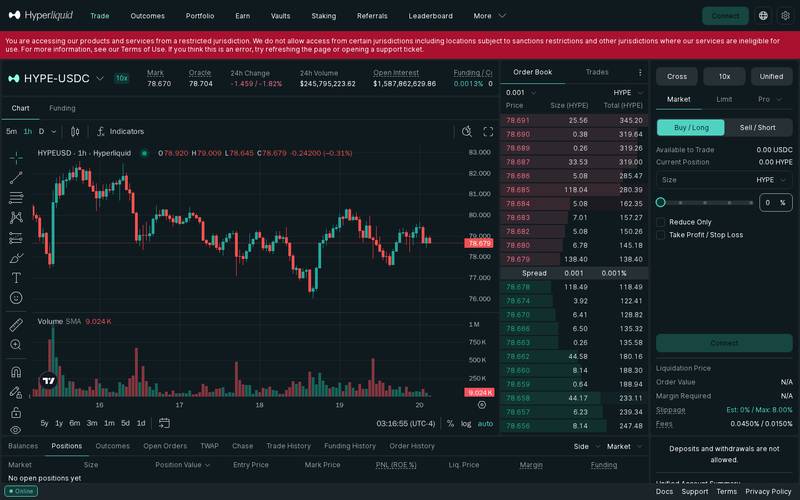
- Click the Limit tab.
- Enter your desired entry price in the Price field. For example, if HYPE is trading at $77.39 and you want to buy at $75.00, type 75.00.
- Enter your position size.
- Click Buy / Long. Your order is placed in the on-chain order book and will only fill if the price reaches $75.00.
The benefit of limit orders on Hyperliquid is that resting limit orders earn the 0.0150% maker rebate instead of paying the 0.0450% taker fee. On a $5,000 trade, that difference is $3.00 per trade, which accumulates meaningfully for regular traders.
You can view and cancel open limit orders in the Open Orders tab at the bottom of the screen.
How to Use a Referral Link
What Is a Referral Link?
A referral link is a special web address that carries a code identifying who sent you to the platform. When you use one to sign up or connect your wallet, the platform records that relationship and typically shares a portion of the fees you generate with the person who referred you, and sometimes gives you a discount too.
Think of it like a tip jar: Imagine a friend recommends a new restaurant and the owner gives your friend a small commission every time you visit. The referral link system works the same way, except it is automated by code running on the blockchain.
How to Use Someone Else's Referral Link
When someone shares a referral link with you, here is what happens step by step:
Step 1: Open the link
Click the link your friend or influencer shared. It will open Hyperliquid with a special code in the URL that tells the platform who referred you.
On desktop:

On mobile:

Step 2: Connect your wallet
Connect exactly as described in the tutorial above.
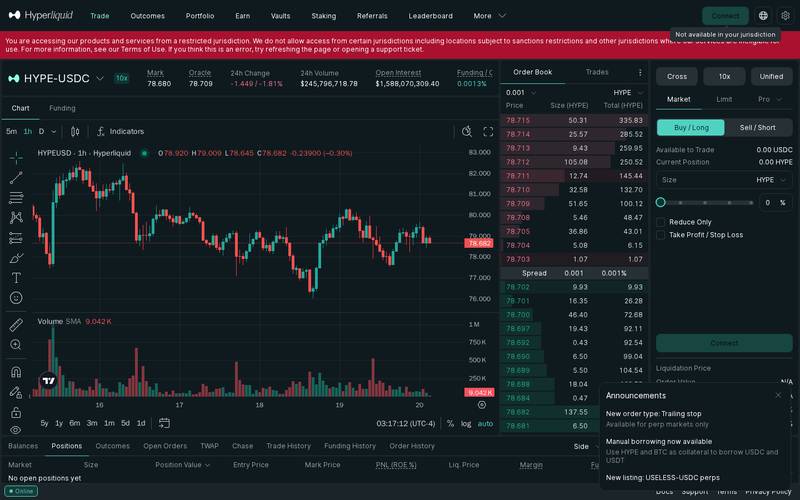

Step 3: Review the trade
After connecting, the referral code is linked to your wallet address. Any fees you generate from trading will be counted against that referral relationship. You do not need to do anything extra. Simply trade as normal.
Step 4: The Optional Tip
Hyperliquid's referral mechanics and any associated fee discounts for referred users are subject to the platform's current referral programme terms. Check the Docs link at the bottom of the platform for the exact current structure, as referral reward percentages and discount rates can change with protocol upgrades. At time of writing, the specific referral fee split percentage is N/A (check docs).
Step 5: Confirm in Your Wallet
After reviewing everything, click the confirm button. Your wallet shows a final confirmation with the exact amounts and the network gas fee. Approve and the transaction executes in seconds.
How to Create Your Own Referral Link
- Connect your wallet to app.hyperliquid.xyz.
- Navigate to the referral or affiliate section of the platform (check the sidebar navigation or your account settings area).
- Generate your unique referral code or link.
- Share the link via social media, a newsletter, or directly with friends.
- Track your referred volume and earned commissions in the referral dashboard.
Note: The exact steps and eligibility requirements for creating a referral link may require a minimum trading history or account standing. Check the current Docs (linked at the bottom of the platform) for up-to-date requirements.
For Hyperliquid Influencers and Affiliates
If you have an audience interested in crypto trading, Hyperliquid's trading product offers genuine appeal to share. The platform has strong volume ($219 million in 24-hour volume on the HYPE-USDC perp alone), professional-grade tools, and a non-custodial structure that resonates with the crypto-native community.
When promoting Hyperliquid as an affiliate, keep the following in mind:
- Be transparent with your audience that you earn a commission when they use your link. This is both ethical best practice and a legal requirement in many jurisdictions.
- Highlight the maker rebate (the 0.0150% reward for limit orders) as a genuine benefit for active traders in your audience.
- Note the jurisdiction restrictions. If your audience is in a restricted region, they will not be able to use the platform, so clarify this upfront.
- The new trailing stop feature (perps only) and manual borrowing are good talking points for more advanced audiences.
- Avoid exaggerating returns. Leveraged trading carries substantial risk of loss, and responsible promotion means making that clear.
- Specific affiliate commission rates and programme tiers are N/A (check docs) at time of writing. Contact the Hyperliquid team via the Support link on the platform for current affiliate terms.
Security: What You Need to Know
Hyperliquid's core security model is derived from its non-custodial, fully onchain architecture. Because every order and settlement is recorded on Hyperliquid's own blockchain, there is no centralised database for hackers to steal funds from in the traditional sense.
Key security properties based on available information:
- Non-custodial: your private keys never leave your wallet. Hyperliquid cannot access your funds.
- Fully onchain settlement: all trades settle on-chain, meaning the outcome is determined by code, not by a company.
- Transparent order book: all orders are verifiable on the public blockchain.
- Restricted jurisdiction access: the platform actively blocks access from sanctioned regions.
Regarding historical security incidents: no major exploits or hacks of Hyperliquid's core protocol are noted in the available research material. However, no platform is entirely without risk, and smart contract (self-executing code on a blockchain) bugs, oracle manipulation (feeding false price data to the protocol), and bridge vulnerabilities are risks that exist across the DeFi ecosystem. Always review the latest security audits via the platform's docs.
Best practices:
- Never share your wallet's seed phrase (the 12 or 24-word master password for your wallet) with anyone, including people claiming to be Hyperliquid support staff.
- Use a hardware wallet (a physical device that stores your private keys offline) for large amounts.
- Only interact with Hyperliquid via the official URL: app.hyperliquid.xyz. Bookmark it rather than searching every time to avoid phishing sites (fake sites designed to steal your credentials).
- Start with small position sizes until you fully understand how liquidation works.
- Use the Take Profit and Stop Loss features on every leveraged trade to cap your downside automatically.
- Be aware that leverage amplifies losses as well as gains. A 10x leveraged position loses all collateral with only a 10% adverse price move.
Hyperliquid vs Competitors
| Feature | Hyperliquid | dYdX | GMX | Drift Protocol |
|---|---|---|---|---|
| Type | Onchain order book perps and spot DEX | Onchain order book perps DEX | AMM-based perps DEX | Order book and AMM perps DEX |
| Custody | Non-custodial | Non-custodial | Non-custodial | Non-custodial |
| Number of markets | 300+ | N/A (check docs) | N/A (check docs) | N/A (check docs) |
| Taker fee | 0.0450% | N/A (check docs) | N/A (check docs) | N/A (check docs) |
| Maker rebate | 0.0150% | N/A (check docs) | N/A (check docs) | N/A (check docs) |
| Native token | HYPE | DYDX | GMX | DRIFT |
| Trailing stop orders | Yes (perps) | N/A (check docs) | N/A (check docs) | N/A (check docs) |
| Manual borrowing | Yes (HYPE, BTC as collateral) | No | No | N/A (check docs) |
| KYC required | No | No | No | No |
| 24/7 trading | Yes | Yes | Yes | Yes |
Note: Competitor data not available in the research material provided. Values marked N/A should be verified against each competitor's current documentation before making a decision based on this comparison.
Verdict
Who Hyperliquid is for:
- Experienced or intermediate traders who want a professional-grade perpetuals trading experience without handing custody of their funds to a centralised exchange.
- Crypto-native users comfortable with self-custody wallets (managing their own wallet and private keys).
- Active traders who want to earn maker rebates by placing limit orders rather than always paying taker fees.
- DeFi users who want to use their HYPE or BTC holdings as collateral to borrow stablecoins without selling those assets.
- Anyone who values full on-chain transparency and verifiability of their trades.
Who should look elsewhere:
- Complete beginners who have never used a crypto wallet before. The learning curve is real. Start by learning how to use MetaMask or a similar wallet before attempting leveraged trading on any DEX.
- Users in restricted jurisdictions. If you are in a sanctioned region, the platform will block access.
- Traders who prefer simple token swaps without leverage. A straightforward DEX aggregator may be a better fit.
- Anyone not comfortable with the risks of leveraged trading. Liquidation risk is real and significant. With 10x leverage a 10% move against your position wipes your entire margin.
- Users who want fiat on-ramps (depositing regular currency like dollars or euros directly). Hyperliquid requires you to already have crypto in a wallet.
Rating: 4.4 / 5
Hyperliquid delivers on a genuinely difficult promise: a centralised-exchange-quality trading experience that is fully decentralised and non-custodial. The order book is fast, the fee structure rewards active and sophisticated traders through maker rebates, the market selection at 300+ is among the largest in onchain perpetuals, and newer features like trailing stops and manual borrowing show an actively developed product. The main limitations are the steep learning curve for newcomers, jurisdiction restrictions, and the inherent risks of leveraged trading that no platform design can fully mitigate. For the right audience, Hyperliquid is one of the most compelling perpetuals DEX products available today.
Quick Links
- Main trading app: app.hyperliquid.xyz
- Documentation: Follow the Docs link at the bottom of the trading interface
- Support: Follow the Support link at the bottom of the trading interface
- Terms of Use: Available at the bottom of app.hyperliquid.xyz
- Privacy Policy: Available at the bottom of app.hyperliquid.xyz
Last verified: October 20, 2026. Screenshots taken live from app.hyperliquid.xyz.
Defiliban · Admin

Admin
@annv1711gmail-com